Android field instrument

Turn a walk into a field session.

Signal Walk brings the wireless and sensor readings already available to your Android phone into one clear, timed capture. Watch the environment change, save the session, and export it for deeper analysis.

  • See Bluetooth, Wi-Fi, cellular, motion, environmental, and location-quality readings together
  • Preserve notable changes in an organized session you can revisit
  • Choose the right privacy level before creating an export
Coming to Google Play Explore the workflow

No account · Local session storage · User-controlled exports
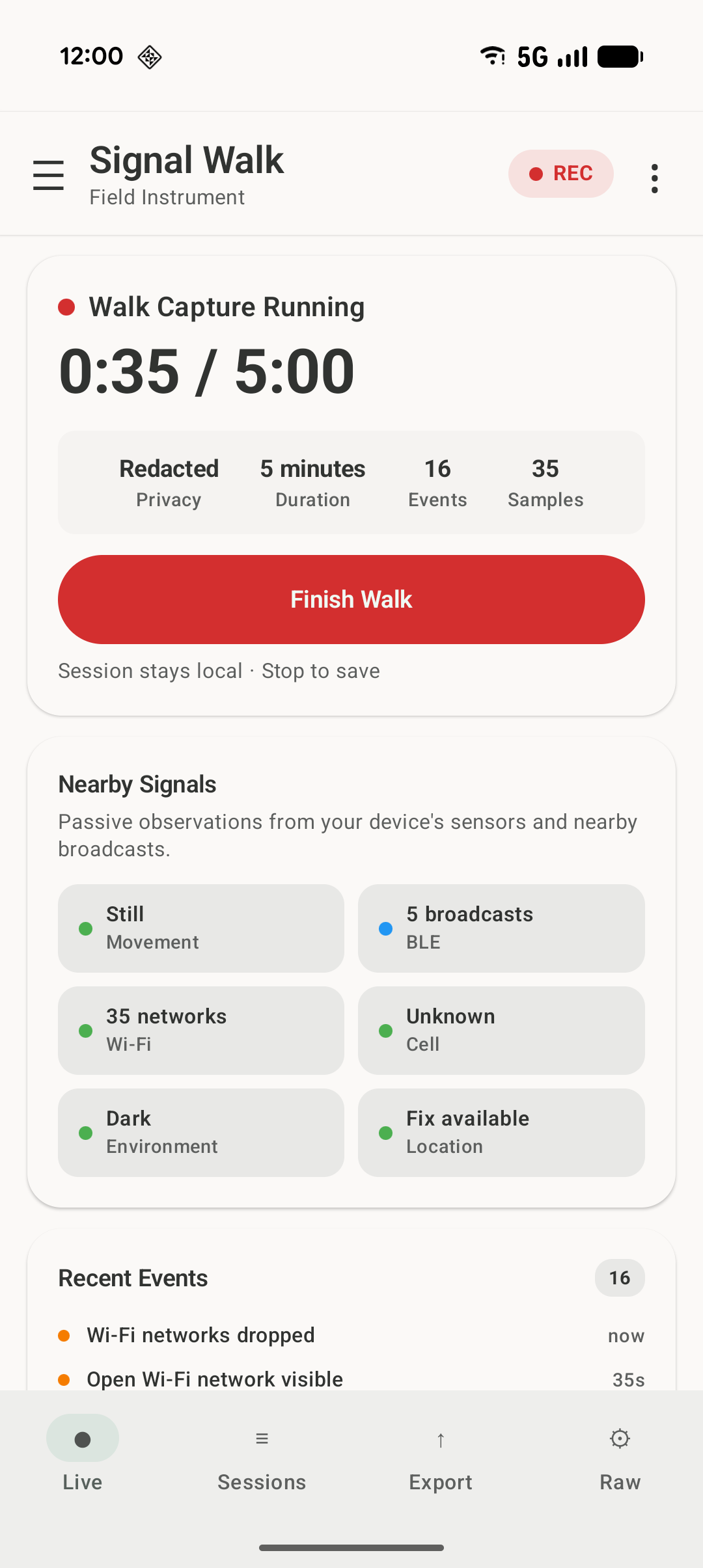
Signal Walk Live screen showing a walk capture, nearby signal counts, sensor status, and recent events
  • Passive observationNo joining or connecting to nearby devices or networks
  • Local-first sessionsYour saved captures remain in the app's private storage
  • Clear export choicesRedacted mode is the share-conscious default
  • No account requiredOpen the app and start exploring

A usable record of the moment

From ambient readings to useful context

A phone exposes a stream of disconnected measurements. Signal Walk gives them a shared timeline so you can understand what was available, what changed, and when it happened.

Live

See the environment change as you move

Start a Walk Capture and follow nearby signal counts, motion, environmental readings, location quality, and notable events from one focused screen.

Signal Walk does not invent meaning for a reading. It organizes what Android makes available so you can inspect the session in context.

Sessions

Keep the result, not just the moment

Each capture becomes a session with a clear beginning and end, the readings available on your device, and the notable changes recorded along the way.

  • Review a walk after you return
  • Compare different places or times
  • Keep the original session separate from exported copies
  • Delete individual sessions or clear them all from the app

Simple by design

One walk. Three steps.

Exact readings depend on your phone, Android version, granted permissions, and the surrounding environment.

  1. Start a capture

    Signal Walk begins a timed session using the supported wireless and sensor readings exposed by Android.

  2. Take the walk

    Move through the environment while the Live screen organizes counts, readings, status, and notable changes.

  3. Review or export

    Return to the saved session, compare what changed, or create a privacy-conscious file for another tool.

The field kit

Useful at a glance. Detailed when you need it.

01

Live capture

A focused dashboard for nearby wireless activity, phone movement, environment sensors, and recent events.

02

Saved sessions

Keep a durable record of a walk so it can be reviewed instead of disappearing when the live view closes.

03

Privacy-aware exports

Choose Detailed, Redacted, or Summary-only output based on how you plan to use or share the result.

04

Home-screen widget

Check key status indicators or launch a short capture without navigating through the full app first.

05

Raw telemetry

Open the deeper view when you want the underlying readings and device capability details.

06

Optional field tools

Opt in to map imagery when needed and use supported on-device AI summaries without a Signal Walk account.

Your data, your next step

Move from observation to analysis

Export a live snapshot or a saved session, then open the result in a spreadsheet, chart it in a notebook, inspect it with a script, or archive it with your project notes. Signal Walk creates the file; you decide where it goes next.

Detailed

More telemetry for technical inspection, while the highest-risk identifiers remain excluded by design.

Summary only

Counts, labels, and session metadata for the smallest and simplest output.

Ready before the app opens

Put the instrument on your home screen

Check BLE, Wi-Fi, motion, and location status at a glance, or begin a short capture directly from the widget when the moment is already moving.

A clear surface with depth underneath

Go deeper without cluttering the main experience

The Live screen keeps the primary task readable. The Raw view exposes the underlying telemetry and device-capability details for users who want to inspect exactly what their phone can provide.

Everything has a place

Move quickly between the job and the details

The navigation drawer keeps the core workflow—Live, Sessions, Export, and Raw—close at hand, with settings and optional features separated from the primary capture experience.

Built for careful curiosity

A practical tool for learning, testing, and field notes

Curious Android users

See how much environmental context a modern phone can observe without turning the experience into a wall of raw numbers.

Developers and testers

Compare sensor availability, permission behavior, and device capabilities across different Android hardware.

Wireless and sensor hobbyists

Create informal, organized field sessions for personal learning and exploration of ambient conditions.

Know what the instrument means

Observation, not identification

Signal Walk organizes information exposed through supported Android APIs. It does not intercept communications, inspect message content, identify people, connect to nearby devices, or prove why a signal appeared.

It is not a threat detector, surveillance system, or forensic instrument. Use it to learn about environments and devices—not to draw conclusions about individuals.

Read the complete Responsible Use guidance.

Local-first by design

Your sessions stay under your control

Signal Walk does not require an account or a developer-operated session-data service. Saved sessions remain in the app's private local storage unless you choose to export or share them.

Read the Privacy Policy
  • No accountThere is no Signal Walk login or cloud session library.
  • Saved sessions stay localThe app keeps session metadata, event records, and generated insights in private app storage.
  • Exports are explicitFiles are written only when you request a report, snapshot, or recording export.
  • Optional network featuresOnline maps and Google model delivery are disclosed and user-initiated.

Device compatibility

Your phone decides what is available

Signal Walk uses supported Android APIs and the sensors present in your device. Exact readings vary by phone model, Android version, permissions, radio state, and surroundings.

Signal Walk currently supports Android 12 and newer (minimum SDK 31) and is built against API level 36. Bluetooth scans, nearby Wi-Fi scans, cellular status, and precise-location map features each depend on their related runtime permissions.

If you decline some permissions, the app still opens and you can review saved sessions, manage exports, read the policies, and use the offline field-grid map mode, while the blocked channels stay unavailable until you grant access.

Online imagery is opt-in. When it stays off, the map remains in field-grid or offline mode. Optional AI summaries run only on supported devices after a disclosure and model-availability check, so availability varies by device.

Contact Signal Walk

Reach the right address directly

Choose the mailbox that matches your question so it reaches the right place without being passed around.

Product support

Installation help, Play Store support, feature questions, and general troubleshooting.

support@signalwalk.com

Privacy

Questions or requests related to the Privacy Policy and personal-data handling.

privacy@signalwalk.com

General contact

Partnerships, press, project questions, and anything that does not fit elsewhere.

hello@signalwalk.com

Developer contact

Developer identity, publishing, technical ownership, and platform-provider inquiries.

developer@signalwalk.com

A field instrument made to move

Take Signal Walk for a walk.

Capture a few minutes, review what changed, and discover what your Android phone can tell you about the environment around it.

Coming to Google Play